I run my issue tracker on one Cloudflare Worker: no server, no Postgres, $5 a month
Yiğit Tanrıverdi ·
Gateweave Track is an open-source issue tracker in the spirit of Linear: lists, boards, cycles, projects, an inbox, keyboard shortcuts for everything. It keeps a copy of your workspace in the browser, so it opens at once, shows edits before the server has answered, and keeps working offline.
Everything runs as one Worker on your own Cloudflare account. There is no server to patch, no Postgres to back up, no Redis, and no container running at 3 a.m. with nobody using it. Track’s own work is tracked in Track, including the tasks for this post.
The first commit is from October 27, so this is early. Here is what it does today, what it costs, and what you give up.
All the moving parts
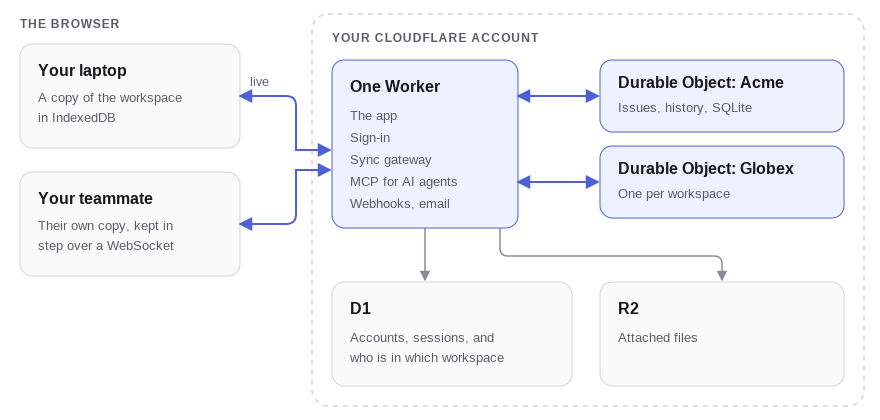
Each workspace gets its own Durable Object with its own SQLite database, so each one has a single writer and strict ordering, and one busy workspace doesn’t slow another. A workspace nobody has opened in a while uses no compute. The Worker checks who you are, and only then forwards you to the object, which has no public route of its own.
I wrote up the sync engine in How Track syncs: the oplog, the offline queue, and how two people editing the same issue merge per field.
The numbers
| What | Median | How it was measured |
|---|---|---|
| An edit reaches a second browser | 71 ms | 15 runs on the live demo, from Berlin, over the real network |
| Open a workspace of 2,034 issues from the local copy | 329 ms | 5 runs, on every build in CI |
| Change the priority of all 2,034 issues at once, until the screen shows it | 98 ms | 5 runs, on every build in CI |
The last two are budgets that fail the build if they get several times slower. The first was the fastest at 67 ms and the slowest at 254 ms, and the slowest was the first edit of the run. It depends on how far you are from the Durable Object, and I’m probably close to mine.

What it costs
This is what my own instance used in its first 11 days, scaled up to a 30-day month, next to what the Workers Paid plan includes for its $5 minimum:
| Resource | My use, per month | Included |
|---|---|---|
| Worker requests | 33,600 | 10 million |
| Worker CPU time | 758,000 ms | 30 million ms |
| Durable Object requests | 35,800 | 1 million |
| Durable Object duration | 301 GB-s | 400,000 GB-s |
| SQLite rows written | 75,400 | 50 million |
So the bill is the $5 minimum, which is per account and covers whatever else you run there. By these numbers the first limit you’d reach is Durable Object requests, at about 28 times this use, and another million of them costs $0.15.
Be careful with that, though. “My use” is one person and a few coding agents working on over 300 issues, which isn’t a load test. Nobody has run Track with a hundred people yet. Email, if you turn it on, and your own domain aren’t counted here.
What broke when I pressed my own Deploy button
Track has a Deploy to Cloudflare button that copies the repository to your GitHub, creates the database and deploys it. Inside the project’s own repository everything looks fine. So I pressed the button for Track’s sibling products, which share its setup, on a real account, and used the copies. All of this was broken, and none of it had shown up in CI:
- Every push to a branch failed to build. The button turns on Preview builds, and Wrangler won’t
build a Preview unless
wrangler.jsonchas apreviewsblock, which can be empty. Since the copy also brings.github/dependabot.yml, the first thing that happened to a new copy was a failed Dependabot pull request. - The next deploy removed settings typed into the dashboard. Wrangler deletes plain-text variables
that aren’t in the config, so a push would quietly turn off Turnstile or email.
keep_vars: truestops that. - A copy can’t merge updates. The button imports the code as one new commit, with no history shared
with the original, so
git mergehas nothing to work from. There’s now a script that works out which release a copy came from and brings the new one in as a single commit. I ran it through two real updates on a real copy, and the data, secrets and dashboard settings stayed. - A Preview gets none of your bindings or secrets. A deployment missing its database or secret now answers 503 and says what’s missing, instead of half working.
If you ship a Deploy button, press it yourself on an account that has never seen your project.
How much of this AI wrote
Most of it. AI coding agents write the code: Claude Code does the bulk of it, and Devin reviews pull requests. I set the goals and make the calls that cost money or carry my name. The agents do the rest, including filing and closing their own issues in Track through its MCP server. That’s how a project this young already has 208 merged pull requests and 54 releases.
That goes for this post too. Claude Code wrote it and took its measurements, so where it says “I pressed” or “I ran”, an agent usually did that on my say-so.
The speed isn’t the interesting part, because it’s also how you get a pile of code nobody understands. The agents have written tests that pass with or without the fix, and once reported “all held” from a run that hadn’t checked anything. So the rules are written down in AGENTS.md and enforced where they can be:
- Every bug fix needs a test that is seen to fail without the fix.
- Worker tests run in
workerdagainst real Durable Objects and real WebSockets, and browser tests cover sign-up, realtime across people, and working offline. - Slower builds fail on the budgets above, and nobody may loosen a budget to get a change through.
- A second agent reviews each pull request, and it has caught real bugs in the first one’s fixes.
None of that replaces a person who has read every line, and nobody has. Judge it accordingly.
What you give up
- It only runs on Cloudflare. There’s no
docker-compose.ymland there won’t be: Durable Objects are the architecture. You own the account, the code and the data, but not the machines. You can export a workspace as CSV or JSON at any time, and the code is AGPL-3.0. - The Free plan won’t do. A Free plan request gets 10 ms of CPU, and checking a password took 85 ms the one time I measured it. Hence the $5.
- It’s young. Expect breaking changes before 1.0, and there has been no outside security audit.
Try it
- Open the demo. One click gets you a private workspace full of sample issues. Open it in two windows. It’s deleted after a day.
- Deploy your own in a few minutes, with the self-hosting guide next to you.
- Star it on GitHub if you’d like to see where it goes. It’s how people find a project this new.
I’d like to know what would stop you from moving your team’s tracker to something like this. Is it being tied to Cloudflare, the age of the project, the way it was written, or something I haven’t thought of? Issues are open, and so is the repository.